Thursday, 10 April 2014
Tuesday, 8 April 2014
Evaluation Question 7
Looking back to your Preliminary Task, what do I feel I have learnt in the progression from it to the full product?
In this question I will be comparing my Preliminary Task 'The Payment' to my Main Task 'Shadowed', and discussing things like what I have improved in and the progression that I have made since the Preliminary. I have demonstrated and summarised what I have learnt during the AS media course and mentioned how satisfied I was with my Preliminary Task looking back at it.
Click the image below to go to my Preliminary Task and Evaluation:


Monday, 7 April 2014
Evaluation Question 6
What have I learnt about technologies from the process of constructing the product?
In this question I will be talking about the different technologies I have used (software, hardware, and web resources) throughout my AS media studies course and I will also be mentioning the advantages of each technology and how they have evolved and become better over time. Plus, there will be a section on whether I had any technical difficulties, and any limitations/barriers to success or creativity as a result of an insufficient technology.
Evaluation Question 6
Technologies used used in the R&P stage:
Google

During the Research and Planning stage of my AS media studies, I used Google to research elements of our course: such as the Rule of Thirds and Production Company Idents, as well as information on camera equipment, camera techniques and to operate the equipment.
This proved much better than using books, which was the original google back before Internet was around, because it's quick and easily accessible from either our phones or Imacs. It's much easier than lugging round a massive pile of books that have dozens of pages in them to find one little piece of information; which makes Google a much more efficient way of accessing information. However; not all information on the internet that is found, can be 100% reliable.
Blogger


I used Blogger in my Research and Planning for my media work because it's an up-to-date web resource where you are able to post information for Media or anything easily and efficiently, while being able to edit & delete what ever post we want at any time. Blogger allows you to update posts to any viewers and the viewers can be from anywhere in the world. This modern technology can be compared to magazines because they both communicate to a set audience - mostly people who enjoy gossip or information finding. Blogger is a better evolvment from magazines because you are able to alter information instantly whereas in a magazine you have to reprint the page if you did a mistake.
Furthermore, Blogger is more of a constant thing because you are able to update and post things each day whenever you want, whereas magazines are normally monthly and printed out in bulk so you aren't able to update the posts whenever you want.
Microsoft Word

I used Microsoft Word to do my storyboard. I felt that using Word was a much better piece of technology than paper for example (which in the olden days was the only source of writing & storing information), because it allows you to simply delete a mistake by the press of a button whereas when you wrote things down on paper you had to constantly rewrite the whole document if you did one mistake. It also looks a lot more professional for school work and important documents while also allows you to copy & paste pieces of work more than twice = which saves time and effort and makes the documents look consistent.
YouTube

I used YouTube in the R&P stage of the course to both research and use certain film/video clips and production company idents that were required for my research. The advantages to being able to access a web resource like YouTube is that you are able to find near enough any type of clip you want instantly, instead of having to trawl through a dozen films or images for one small clip or screenshot.
Scribd

I used Scribd a few times during my Research and Planning stage to embed documents onto my blog without the hassle of photographs or photocopying + scanning to get the image onto it. Scribd allows a quicker and easy way to get a Word document, for example, onto the internet without any fuss other than to convert the document into a PDF file.
Scribd used to be simply photocopying; which was more slower and cost a lot to get the ink needed to print out the photocopies. It also meant a lot of paperwork was involved during transfers and so could have resulted in the documents getting bent or messed up instead of kept presentable.
Technologies used in the filming Stage:
Imac
 |
| Imac was used in all of the media stages mentioned |
This piece of Hardware technology was the main tool used throughout the whole of the different media stages. The advantages to using an Imac are that you can use certain software programmes like Soundtrack pro to create pieces of media work, while surfing the internet at the same time and opening other programmes as well. Also, the Imac has a pretty big screen which allows the user to see everything better when doing their work.This is much better than a normal laptop or paper because you are able to use programmes and do things you wouldn't be able to do on paper or a laptop.
While using these Imac's myself and my group ran into difficulty on various occasions where the programme we were using froze and we had to restart the whole computer; this wasting precious time and also one the one occasion losing all of our work.
While using these Imac's myself and my group ran into difficulty on various occasions where the programme we were using froze and we had to restart the whole computer; this wasting precious time and also one the one occasion losing all of our work.
HD Camera

The HD Camera was not only used to film my media product but was also used to film mini preliminary tasks and examples for my research and planning stage. In the filming stage, the HD Camera was used to film many interesting camera shots through doing hand held tracking shots, panning shots, Vertigo shots, Point of Views and many more. The advantages to the modern day cameras are the fact that they are easier to handle and are able to store plenty of photos and videos until you are ready to get the printed off; unlike the historical cameras which needed to be printed as soon as they were taken.
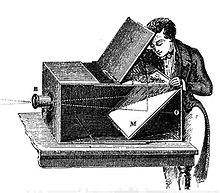
The camera has made many developments to get to the standard it is today. In the 18th Century, cameras used to be what was known as "The Camera Obscura" which were basically big machines that were used to manually trace images way before the invention of photographic cameras.
 |
| The Camera Obscure |
The earliest cameras were big enough to fill a room with not much space for more than 1-2 people inside: however they got more and more compact by the time of the first partially successful photograph of a camera image was made in 1816 by Nicephore Niepce, by using a very small camera of his own making a piece of paper coated in Silver Chloride - which darkened when exposed to light.
 |
| 19th Century Studio camera |
The 19th Century "Collodion Dry Plates" were available in 1855 but they weren't rivaled wet plates in speed and quality until 1871 invention of the "Gelatin Dry Plates". For the first time cameras had become hand held and even concealed = like cameras in pocket watches, hats and other objects.
Tripod

The tripod was used in my film to stop any shaking of the camera when we wanted to do panning shots or simple 'still' shots where the camera wasn't moving. The advantages of using this piece of hardware is the fact that the shots you get from the camera when using the tripod are smooth and steady or perfectly still.Tripods were used along with studio cameras in the 19th century, however those tripods weren't very flexible in the heights they could go up to, where as now-a-days you can get tripods that can reach 3 levels of height.
Myself and my group encountered a small technical problem with this piece of equipment on one of our shooting sessions when the Tripod suddenly decided it had had enough of holding the camera and felt it wanted to fall onto one of my team member's head. To overcome this problem we paid extra attention to whether the camera was securely locked into place every time we shifted the tripod into a different place = plus there was a lot of ducking involved every time the camera + tripod were moved... just in case :)
Tracking Dolly

Throughout our film we used the Tracking Dolly for one scene of our film: 0:48 - 0:54 where our Protagonist heads towards the box in the corner of the room. Notice how at this point of the film the camera work is smooth and steady as we move the camera to follow him to the box.
Using the tripod helps to stabilise the camera to create more efficient shots than hand held and allows some pretty good effects. It also helps to keep the characters in the centre of the frame or at least in shot if there are two or more people in the frame, without some people falling out of it.
The limitations of using a tripod is the fact that the tracks you put the dolly on are only so long, meaning when you are pushing the camera along for a really long scene for example, you have to either stop recording to move the tracks along or keep running around to take the back two tracks to the front just in time for the camera (note; this idea rarely ever works) :)
Reflectors

The limitations of using a reflector is the fact you need light to reflect the light elsewhere; so if its a dark room - then light is difficult to be reflected. This is the difficulty we encountered while using this piece of equipment because our location had a small dark corridor coming off it - while outside was night, which meant there was very little light coming through the corridor when the lights were turned off. We finally solved this by using the LED camera light to give the effect of moonlight. However, it still didn't work as we wanted, so the scenes were edited on Final Cut Express to make them brighter so you could see what was happening,
The advantage of using a reflector is that its useful in dark spots of a set or to light up somebodies face to get rid of any shadows cast by facial features. It makes the shots appear much better to the eye.
The advantage of using a reflector is that its useful in dark spots of a set or to light up somebodies face to get rid of any shadows cast by facial features. It makes the shots appear much better to the eye.
LED Camera Light

The advantage to using this piece of hardware equipment was so we were able to light up any area of a set that was slightly too dark for filming in. This provides a well light set or a certain effect to whatever you wish to film. We used this equipment in the creation of a film to act as moonlight coming through the doors as the bottom of the corridor.
This technology compared to the historical approach is much better because the historical approach were much larger lamps used that had only one function - the on & off button - and were rather hard to lumber around. This makes the modern camera light much more efficient because it's much smaller (allowing the carrying process to be easier), it's more energy efficient and there is a small file on it that allows the user to adjust the amount of light being filtered out, which allows a more effective light source than a massive full on beam.
 |
| Evidence of using Camera light |
Exterior Sound recording kit

We used the exterior sound recording kit to record certain sounds of our film in closer detail to get a better recording of the sound. For example, footsteps were too quiet on the camera recording, so we decided to use the sound recorder to help capture the footstep noise. The advantages of using a sound recording kit is that it's small, easy to use and it picks up sound efficently and better than the camera's recorder.
In very old films, sound was never used in the film - they were often just black and white movies that was often actors miming to some music that was dumped over the top of the film to give a jolly effect. An example of this type of historical approach would be Charlie Chaplin:
Technologies used in the editing stage:
Final Cut Express

At the start of the course I didn't even know there was a software programme called Final Cut Express. I mainly used Windows Movie Maker. I used Final Cut Express to cut and edit the shots myself and my group had filmed to create the rough cut and final cut. The advantages of using Final Cut is that you are able to cut and stick sections of your film together with ease and no destructively, while being able to undo any mistakes if required a lot easier by being able to just simply undo the last move and to start again with a seemingly untouched piece of work. Furthermore, you don't have to start at the beginning of your film through to the end; meaning that Final Cut is a Non-Linear technology.
In historical times, the past Final Cut used to simply be film reels that were marked with a piece of chalk at the point the editor wanted to cut, it was then chopped and stuck together. This proves to be destructive editing been as the film was being cut up and stuck together and whenever a mistake was made, it all had to be redone again by re-gluing the chopped parts back on even if you were other by a few frames.
Soundtrack Pro

Soundtrack Pro was one of the main editing programmes that we used alongside with Final Cut. This was because we used this software to create and finalise the soundtrack for our film by searching for sound-effects and non diegetic music to edit in.
The advantage behind using Soundtrack pro was the fact that it was easier to place the music and effects wherever we wanted and needed on the different track lines. We could alter the volume of certain sections of music, make it fade in and out when we wanted it to and were also able to mute certain sections of the soundtrack by using the 'Mute' button, which is useful when listening to the soundtrack without elements playing with no need to delete them.
FreeSFX Website

The Free sfx website was used to gain a few more pieces of sound effects and music for both my final media product and a couple of my evaluation questions. Having this website so close to hand on the internet was helpful because it allowed me to use sounds that weren't under any copyright laws and were completely free to use. This is an advantage because not everybody wants to pay out for soundtracks they will probably only use once and of course nobody really wants to go up against copyright laws.
Technologies used in the Post-production stage:
Imac
After Effects

I used After Effects to create my group and myself's production companies ident. We chose to design it to be a fire dragon flying across the screen before making the name of our company appear fully in the centre.
Technologies used in the exhibition/sharing stage:
Youtube
YouTube was again used in this stage to share my finished product on my YouTube account for more people to be able to watch as well as the people in my group and also doing the AS media course.
Blogger

Blogger was used in this stage to embed my finished and exhibited product into my final cut post. After that it was used for more constructive posts and now finally my evaluation questions.
Imac
The Imac was used in this stage to exhibit my rough cut and eventually my finished product to my target audience while afterwards I then uploaded it to my YouTube account from where I embedded onto my blog.
Technologies I used to communicate with my production team:
Youtube
I used YouTube to communicate with my production team because any finished filming or editing work we did and uploaded onto YouTube, we used mine - which meant I had to make sure the work was on my account for my team to access whenever they wished. Without the use of YouTube, it would be even harder to share out the videos and would also make it harder to access our film's from home should be need to.
Mobile Phones

I used texting to communicate with the rest of my production team; texting each other when to meet up to work on some of our evaluation questions or the times when to meet at media to film. The advantages of using mobile phones and texting are things like the fact that texting is more instant and the receiver gets the message quickly enough where as back in the day, mobile phones weren't around so to communicate you would need to either use a telephone (if you were near one) or send a letter to the other person, which could take a few days to a week for them to receive and respond.
Technologies I used to present my work:
Blogspot
I used Blogger to present the entire of my blog and each stage of my AS media course. Each post has a separate piece of research or work in it, and is posted in the order of when I learnt each aspect and did each thing.
Again the advantage of using Blogger to present my work is that it helps keep my work presentable and easy to access within a few click of a button. Everything is simple to find by using the sidebar of my blog. This software is much better than using a folder for example because you can lose pieces of paper or break folders and so having a blog keeps everything together in one place and is there to access whenever.
Imac
The Imac was used to present my work on the whole because it was the main object that had all of the software programmes on it for me to use. It allowed me to present my work to the group however and also made me able to
Prezi EDU

I used the educational Prezi (Prezi EDU) to create prezi shows to answer some of my evaluation questions. The idea was to make an informative slideshow with an interesting twist with the more fancier animations. The advantage of using Prezi is that your work looks a lot more inviting and fancy while looks more professional and appropriate for media studies. Prezi compares with the old slide show creating software Microsoft Power Point where the slides were much more simple and can be seen as boring in the eyes of media.
Limitations and Barriers:
One limitation to the creativity of our film would be the fact that in a real media product, special effects and CGI are able to be done using a green screen. Obviously, my group and I were unable to access such equipment, so we settled for simply using different effects from Final Cut Express - such as the fade in we were going to use to make our Antagonist disappear in our rough cut. However, we decided against it when the disappearance confused a few members of our audience.

Another limitation is the amount of cameras we had to film our opening. We only had 1 to shoot everything, which meant any Match-on-Actions we filmed had to have plenty of attention put on them to make sure we got them spot on. This limitation could of hindered our success because had we done our Match-on-Action terribly, then our film wouldn't have got such a good mark or attracted our audience as good.
In real media filming of existing media products, they sometimes have more than one camera filming a scene so that they can see which angle fits best and also to get much better Match-on-Actions.
 |
| Before fade out (Rough Cut) |
 |
| After fade out (Rough Cut) |
In real media filming of existing media products, they sometimes have more than one camera filming a scene so that they can see which angle fits best and also to get much better Match-on-Actions.
Sunday, 6 April 2014
Evaluation Question 5
How did we attract/address our target audience?
Together, myself and my group put together a small, 4 minute, narrated video about how we were attracted and addressed our target audience. We have mentioned what parts of our film we feel our target audience would fine appealing and referred back too the feedback we received when we showed it to people of our target audience's age range.
Evaluation Question 5
Continued:
One barrier however that myself and my production group faced was the problem of having real, big movie stars to actually play a role in our film - it's quite impossible. This rather throws a hammer in the works for us because through this inability it will hinder the film attracting a particular type of audience: such as a Hugh Jackman fans would watch thriller films such as Van Helsing and Catfish or fans of Tom Cruise will instantly go to watch a new Mission Impossible film.
Another barrier was the fact we couldn't get real distributors to distribute our film. This sort of works like the actor problem; well known distribution companies such as UNIVERSAL draw a particular type of audience - not just UNIVERSAL fans but fans of the type of films it distributes. Movies like Van Helsing, Immortals, Cirque Du Freak and The Fast & The Furious; Tokyo Drift are all UNIVERSAL films. Without our film being distributed by somebody like them, our film isn't able to be well publicised to the public - or appear extremely interesting because it isn't very well known or distributed by a well known company.
Saturday, 5 April 2014
Evaluation Question 4
Who would be the audience for my media product?
What is the BBFC film classification for my film:
Myself and my group chose the BFFC film classification of 15. We awarded our media product with this classification and believed it to be appropriate because we feel that viewers younger than 15 may get slightly scared or unnerved by the violence and jump-scares that are involved in the film. The usage of creepy footage in our film opening is what we deem suited for 15 and over and we think that had our film opening been a full film, we would have incorporated rather a bit of violence that would fall into the 15 classification.
Click on the image here to go to the British Board of Film Classification website to find out what the different classifications consist of:

My films typical target audience:
 |
| Neil Evans = 16 Years of age |
Our film is aimed at people between the ages of 15-25, who currently are currently in studying or part-time jobs. Neil Evans here is a year 12 student who studies AS Music, AS Physics, AS English and AS Media Studies. He also has a part time job on a Saturday as a HMV assistant. We thought that this list of studies was appropriate to our film because our Protagonist is a Scientist and the idea of him enjoying DVDs links in with him studying Media.

His interests are anything energetic; mainly such things like rugby, while he enjoys reading books, listening to upbeat rock type music and collecting plenty of DVDs. His preferable film genres that he enjoys are such things as Horror, Thriller, Action, Mystery and Science Fiction, which show through in his favourite films. Van Helsing, Taken and Psyco are three of his altimate favourites.

He enjoys watching Van Helsing because of the whole greyscale at the beginning and the fact that it mixes in with the classical story of Dracula and Van Helsing. The thriller side of the film intrigues him as well as the SFX, camerawork and CGI of the creatures designed. This connects to our film because we also use Greyscale to bring out that old fashioned horror feel to the film and also we have used many SFX to build tension and camerawork to bring out the Protagonist and Antagonist's characters and to add to the suspense.

Taken is on Neil's favourites list because of the thrilling storyline and the thriller aspect of the film. He enjoys how the story is dragged out to build up the tension and also rather likes the twists that are incorporated into it. This real media product matches elements of my own film because of the twists that are in it and the built up suspense that Neil is attracted by.
Pearl and Dean data evidence:
 |
| The Expendables 3 Pearl and Dean data |
Above is evidence from the website Pearl & Dean to justify my claims that my film will attract our target audience of males aged between the ages 15-25. I picked this film to compare to our own film 'Shadowed' because The Expendables 3 has conventions of a thriller in it, the classification is age 15 and it is most suited for males (75%) between the ages 15-24 (44%). We used this comparison to make sure that we had picked the right sort of audience for the genre and type of our film.
Audience theories
On my next question (evaluation question 5) I will be discussing how myself and my group attracted/addressed our target audience by using certain thriller conventions, soundtracks and techniques.
 |
| The Audience Theories |
There are different theories about audiences. Gratification theory is where people watch something not for the entertainment but for whole reason to get something out of it; such things are porn films or really violent films could come under this theory. The audience theories such as the Hypodermic model sees the audience as passive viewers and that the message of the films or the message behind the texts are 'injected'.
Our film is put under the hypodermic model. This is because our thriller film is purely for entertainment purposes which is demonstrated through the jump-scares used and the deep, intense soundtrack. It is pretty much impossible to make yourself purposefully jump at a film - which prevents our film from falling into the gratification theory. Our film includes many thriller conventions and scary elements that allow our film to be entertaining and makes the audience enjoy it for the film itself and not their own particular reasons. (Gratification)
Friday, 4 April 2014
Thursday, 3 April 2014
Evaluation Question 2
How does my media product represent my chosen Social Groups?
For this evaluation question I have chosen to do a prezi to discuss which social groups myself and my group have decided to represent. As you will find out from my prezi, our protagonist was representing those who are scientists or of a professional type of job along those lines while our antagonist was representing Youth Culture. In my answer I discuss the social groups and linked them to my own characters, and how we represented the groups in a stereotypical way while linking this to the real media products = such as Back to the Future and The Strangers.
Evaluation Question 2:
Subscribe to:
Posts (Atom)