Thursday, 31 October 2013

ADVANCED CAMERA WORK - Tracking Shot and Arc Shot

Tracking Shot

   A tracking shot is created by mounting the camera on a dolly. It's mainly used to follow an actor or an object. It can be used to follow characters in a scene or to get a bigger picture of a setting. However this type of shot can be hard to get right due to having to keep the camera at a steady pace and in time with the object/actor. It can also be used above an actor on a crane as well.

Here my group created a tracking shot tutorial on showing how it should and shouldn't be done:


A clip from Kill Bill showing an extensive Tracking shot from above and following from eye level.(Sorry if you can't understand the language - but as it's the tracking we are looking at I thought it didn't really matter...) :) 

A scene from Footloose showing camera following dancers feet:

Arc Shot

  This shot is mainly used when you want to make the camera go behind and around a character. It's often used in dance scenes as the actors are going round in circles etc. This dolly used for this type of shot hasn't got a track but instead three wheels so it is able to move freely around in circles.

This opening scene from The Black Swan has many tracking shots, a few arc shots in it as the camera is moving around her:   

Wednesday, 16 October 2013

Evaluation of my Preliminary Task AND My Preliminary Western Film Video

My Preliminary Task

Last week myself and my group created yet another mini film 'The Payment' - it had to consist of Match On Action, Shot Reverse Shot and 180 Degree Rule all based around dialogue between two or three people. I believe that my film (Called "The Payment") was a success.
     Things that went well:
Out of all the techniques that we used I most liked the Match On Action shots. They work extremely well in our film; especially when Tom walks through the door and around the corner. I also love the soundtrack that we put in; it emphasizes the dramatic tension of Tom walking up to the lockers and then the sudden rumble of music when Tom sees 'The Bodyguard'. The music certainly adds depth to my film.
    Things that didn't go as well:
I'm afraid that although I find my film good - there was a few errors within it that could of gone better. For example the 180 Degree Rule that we used - didn't go completely to plan. We didn't bring the camera round to show the change of angle, instead we used a fade transition (due to a continuity error of the Actor) which did work well in the film.
    How I worked in the team
I found working in the team sufficient. I do have a tendency to play for leader... and often take the lead in the film making process. There were times when things didn't get done as quickly we'd have liked due to lack of communication/ideas. Over-all however we produced a film that we all enjoyed filming and editing.
   What I learnt about working in a production team
I've learnt that to successfully produce a good film you have to all work together and communicate to make things work. You can't just leave everything down to one person and take all the credit for something you didn't do and you cannot take the main leader role and do absolutely EVERYTHING - thus not allowing people in your team to even have a go. This can cause ructions in the team and arguments about how the film should look instead of discussing things.
I have also learnt how the production team works - you have the write, then the producers/directors and then finally you have the editors. These people all play vital roles in the film making industry.

My Preliminary Task Film: The Payment


  My Western Film: 

Saturday, 12 October 2013

How to Write a Script Correctly

To write a script for a film isn't actually how you'd think a script is written. It requires certain guidelines to make the script correct or for the film producers to even look at your story.These steps go as followed:

The main two basic points = Text Size; 12 and the Text Font; Courier.

Here are the steps:
Step 1 = State in the top left hand corner of the script page whether the scene is taking place indoors or outdoors. If it is interior you should but INT and for exterior it must be EXT. This must then be followed by the name or the setting of the place in which the scene is being shot in. Make sure these are in capital letters also. 

Step 2 = A small summary is efficient to make the reader/viewer aware of what is going to happen in the story/script and by adding the summary it adds context to the scene. This will allow what the characters are doing clear the the reader of the script. 

Step 3 = Of course in any script there should be dialogue. For this you must make sure the name is printed in the centre and in capital letters. After this must go the character's action or expression. This must be put in brackets for example - (Angry) or (throws glass bottle). On the next line after this you may write their dialogue.


To be a successful script writer these guidelines are vital to be followed.
The software that I am using to create my own script (my groups) is called Celtx = this allows us to make the script look professional and because it does the guidelines automatically - it lessens the risk of me doing it wrong.

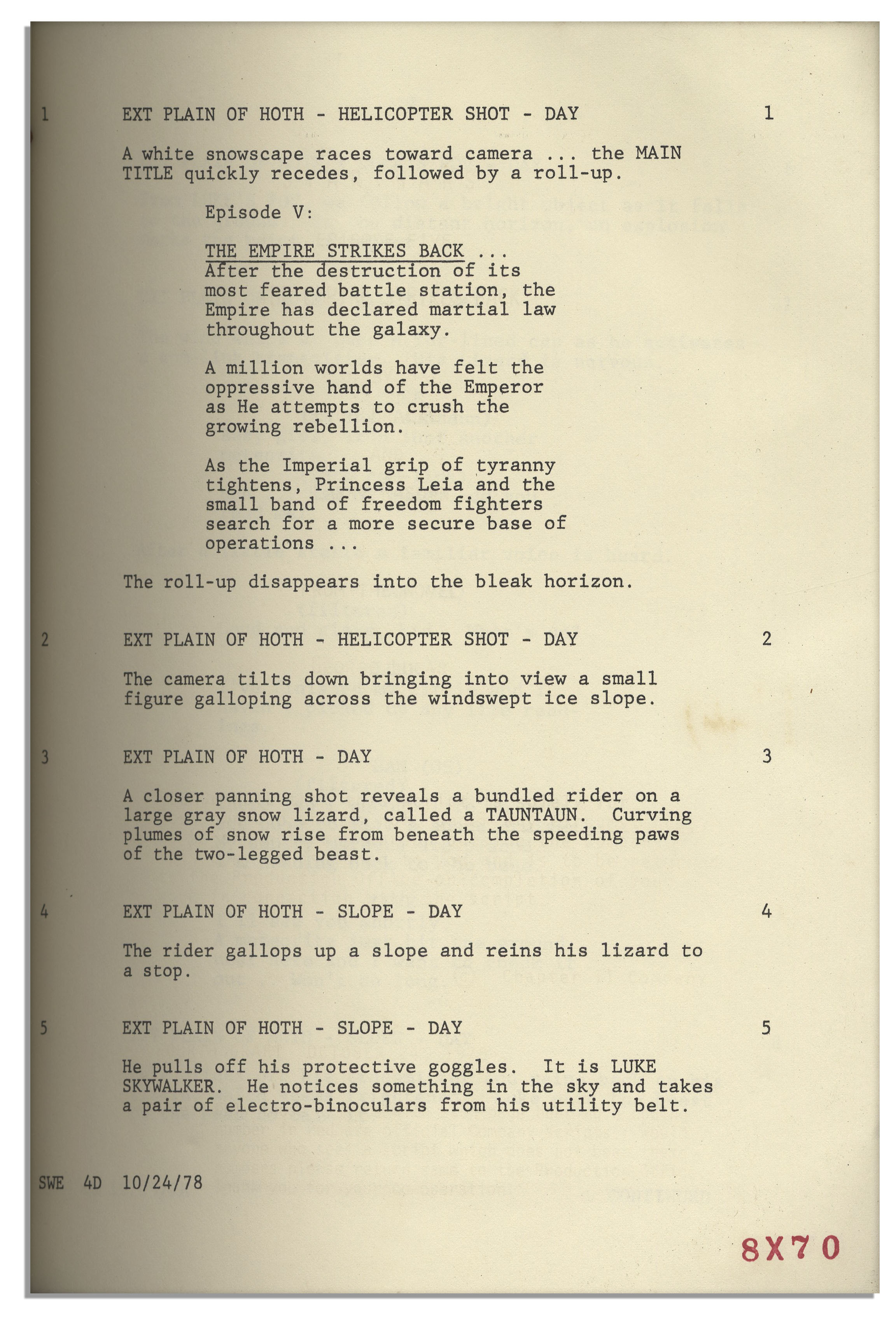
Below is a script extract from a well-known film:

From: 'Star Wars Episode V'

Friday, 11 October 2013

BASIC FILMING RULES: (Continuity, 180 Degree Rule & Rule of Thirds)

Continuity Errors in Film

A continuity error is basically when something changes in a film or happens that shouldn't have. They are in quite a few very popular films - you just need to look hard enough. A continuity error can be anything from a weapon changing between every scene (like in Braveheart) to something small like the reflection of a camera man or seeing a camera man hiding under a desk (Harry Potter).
Here is a few continuity errors from Star wars to help explain what I am trying to say:


When continuity errors occur and they are MAJOR factors that the viewers will most likely notice then the viewer tends to break from the film experience. This is when the frames of the televison `disappear` and the viewer is made to believe the film is actually happening. A continuity error that is minor is not OKAY but is better than a major and can normally be got away with. However film critics or observant people can detecte them rather easily - so it's still best to do them.

Rule of Thirds

The Rule of Thirds is a Camera technique that is often used by photographers and film makers alike. It allows the viewer to get a better view of an object or person - just by where the subject is in the frame. Sounds strange don't it? Well believe me - it has a BIG difference.
    The Rule of Thirds is a grid that is placed on the screen that divides the picture up into 9 boxes. The idea is to get the important subject on either of the 4 corners in the middle of the screen. This is because the brain prefers things that is NOT in the centre of the screen - it likes things in an orderly fashion, so by placing the object on the corners it `relaxes` the brain and you find you prefer these types of photos to the ones where the subjects are in the centre.


Heres a clip that will explain the Rule of Thirds at a more professional standard (cover the parts I've missed) :)

180 Degree Rule

   The 180-Degree rule is basically the simple guidelines followed in film making that shows two or more characters or objects in the exact same scene are ALWAYS in the same position if they are standing still and for example talking (meaning left/right of the characters).
   If you wanted to shift the camera around the characters then using the 180-Degree Rule is what you need to do. This is when you are standing one side of the characters (the left of one character for example) and slowly shift in a semi-circle movement around that character so you end up on the right side of them.
   If you should cross the imaginary axis connecting the two subjects its called crossing the line.


Crossing the line is allowed as long as you show the FULL 180 degree turn around the characters to allow the viewer to see the movement. If this movement does not apply in the film it can cause great confusion of the viewers mind when the characters keep switching from left to right during conversations or action. This image shows the 180 Degree rule as a visual explanation.

Thursday, 10 October 2013

BASIC EDITING: (Match On Action, Split Edits & Straight Cuts)

Match-On-Action

    Match on Action is a Camera technique of which film makers use when making three or more shots look like one flowing action. It's common in fight scenes and horrors where quick action is involved (such as a punch or running). The idea is to get one shot ,such as from the side of an Actor, then to cut to a different view (like over the shoulder) and then cut back to the original place. Match on Action is where you do this and make sure the Actor's movement is the same and matches when the camera changes. Here is an example for you from one of the good old Star Wars Films to make it clearer to understand :)


Here's another Match on Action that is more complex than the Star Wars clip above. It is a scene out of Daredevil - more importantly; a fight scene - which involves many MOAs and quick movement. This clip allows you to see MOA at a much faster pace.


    Match on Action when it goes wrong can be DISASTROUS!!! And I'm speaking from experience - not just knowledge. If Match on Action goes wrong then you may end up with in one shot the character beginning to open a door, and then in the next shot either the character reopens it OR the character has zipped quickly through the door and the door is now closed. Match on Action must be smooth and clean.
    If this goes wrong the effect on the viewer is basically that is pulls them from the film. It makes them realise what they are watching IS in fact a film (completely defying what film makers are aiming for) and makes them slightly confused as to what is happening. :/ Nottt good.
Here's a video showing Match on Action gone wrong:


Split edits and Straight cuts

    There are two different types of cuts in filming; a straight cut and an L cut (split edit). Most cuts in films are presented as straight cuts; both audio and video alter at the same time as each other where as an L cut separates the two - audio overlaying onto a video that is separate. Basically the shape of a split edit makes an L; the change of the video whilst the audio remains the same for a while, however they can work backwards - the audio changing first whilst the video remains the same = e.g: somebody inside a house and the sound of a lorry passing outside without you seeing it is an example of an L cut.Whereas a straight cut would be that as soon as the lorry sound is heard, the video switches to depict a lorry passing by.


Wednesday, 9 October 2013

BASIC CAMERAWORK: (Shot Types, Camera Angles and Camera Movements)

Shot types & Camera Angles   

There are lot's of different shot types and camera angles that can be used in film making. Each shot type has it's own way of effecting the audience and adding a little something to the scenes it is being used in. They can be used to get across different emotions and can make scenes look more or less dramatic e.g: scary, dreamy, violent etc..
    A camera shot from an actor's point of view for example can portray them to the audience as either the most dominant or the most submissive person in the shot. This shot works well with scenes like gunfights - a guy/lady looking up from the floor up at someone holding a gun.
 

The camera angles and Shot types are:
- Wide shot/ establishing shot = used mainly to show the audience where the film/scene is set.
- Two shot = A shot that shows 2 people - often displayed as a Mid shot)
- Mid shot = a shot consisting of the top half of people - not a close up.
- Close up = a shot that shows the detail in a person's head and shoulders
- Over-the-Shoulder = often used when a person is standing facing someone else = a confrontation.
- Point of View Shot = a shot showing what a person is seeing.
- Low Angle = Camera looking up at something from below.
- High Angle = Camera looking down at something from above
- Tilt = The obvious; the camera frame is tilted to apply disorientation.

Camera Movements
In films a director will use Camera movements to draw the audience into the film. By the positioning of the camera and matching the movement with the scene scenario, the director can make the audience feel close to the characters and to feel part of the film. However they can also make them feel  the complete opposite. A zoom shot of the eyes can bring out the fear or anger of the character to life while a crab shot for example is following a characters feet can make the audience wonder whom the feet belong to.

Friday, 27 September 2013

Expected Production Workflow

Expected Production Workflow

   This lesson the class have been thinking about what our expected workflow would be like for our films and in what order the process would come in. Myself and my group thought that the order would go something like this:


The point behind this workflow was to give us an idea behind what the full process would be and what we will be doing when we begin to create our films. The order my group and I put here is not completely correct but for a first attempt we got some parts in the correct place :)